Have you ever been mid-conversation on Slack, discussing a sensitive deployment or a critical fund transfer, and suddenly wondered: Is the person on the other end really who I think they are?
If you work in tech, and especially if you live in the chaotic trenches of the Digital Assets industry like I do, Slack is your central nervous system. It’s where we make split-second decisions, grant access, ship code, and move millions. But because we rely on it so heavily, it’s a prime target for attackers.
The problem in one line: an authenticated Slack session can be stolen and reused without ever triggering a login or 2FA prompt. You need a way to cryptographically re-verify identity without breaking async workflow.
The Threat Landscape: When Slack Becomes the Attack Vector
Forget about poorly worded phishing emails. We are dealing with APT groups (like those from the DPRK) who have taken social engineering to the next level. They pose as recruiters offering dream jobs, slip malicious code into open-source repos, and drop trojanized packages into npm. They only want one thing: a foothold in your company.
And one of their absolute favorite tricks? Session hijacking.
They don’t need your password. They don’t even need to bypass your 2FA. If they can scrape an active session cookie from a compromised machine, they bypass the login screen entirely. They drop silently into your Slack account. And they don’t start spamming. They read. They learn your tone, figure out what projects you’re working on, and see who you report to. Then, they seamlessly hijack the conversation.
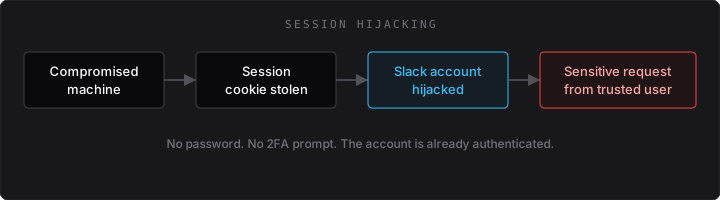
Suddenly, your lead engineer is asking for deployment keys to “hotfix a bug,” your CFO needs you to authorize a transaction to a “new vendor,” or you’re asked to join an urgent investor call. It looks like them, it sounds like them, and it’s coming from their authenticated account. But it’s an attacker sitting halfway across the world.
The Flawed Solutions: Why Video Calls Aren’t Enough
When faced with the “is this really you?” panic, the immediate instinct is usually: “Let’s jump on a quick video call.”
Sounds good in theory, right? In practice, it’s a terrible security control:
- It kills momentum: People are deep in focused work, commuting, or just in noisy rooms. Forcing a call breaks the flow.
- It ruins remote work: We work asynchronously for a reason. Forcing synchronous video to verify every sensitive request completely defeats the point of using Slack.
- The Deepfake Nightmare: Real-time video deepfakes and AI voice cloning are advancing ridiculously fast. Multinational companies have already lost tens of millions of dollars because an employee was tricked by a deepfake of their CFO on a live call. Very soon, seeing a face on a screen won’t prove anything.
We need something asynchronous, frictionless, and above all cryptographically secure.
The Hardware Token Solution: Cryptographic Identity Verification
The answer is hardware security keys, specifically YubiKeys. Instead of relying on something you know (which can be stolen) or something you are (which can be deepfaked), we rely on something you have: a physical, tamper-proof piece of hardware.
I built a custom Slack application called Impersonation Protector to solve this exact problem right inside Slack.
The Engineering Decision: Why Yubico OTP over WebAuthn?
At first, I thought about using WebAuthn (FIDO2). It’s the gold standard for passwordless authentication, and Slack itself supports it for account login. But that’s Slack authenticating you to Slack, not your app running a challenge inside a modal.
Slack apps don’t expose the Web Authentication API. A Block Kit modal gives you text inputs, buttons, and selects. No navigator.credentials.create(). There is no supported way to invoke WebAuthn from inside the Slack client. Your only in-app option is to send the user to an external browser URL, have them authenticate there, and somehow correlate the result back to the Slack session. That works, but it’s a detour.
Yubico OTP fits the platform as-is. The YubiKey acts as a USB keyboard: touch it, and the OTP types straight into a plain_text_input inside the modal. No browser redirects, no context switching, no OAuth dance. OTP as a login factor is phishable, and for normal authentication most teams steer away from it. This isn’t that: you touch the key inside Slack when the bot prompts you, not on a login page a link sent you to.
One UX gotcha worth knowing: the key types wherever the cursor is focused. If the modal loses focus before you tap (you click elsewhere by accident), those 44 characters land in the chat or another app. Always click the input field first, then touch the key.
There is a real protocol trade-off on top of that platform constraint. WebAuthn uses asymmetric cryptography with no shared secrets and no central validator. Yubico OTP relies on symmetric AES-128 on the device and centralized validation through YubiCloud. Given Slack’s app model, the centralized validation is the price you pay for that.
The keylogger problem: because the YubiKey emulates a keyboard, the OTP travels as plain text from the HID layer into the input field. Endpoint malware with keylogging can capture those 44 characters before the bot ever sees them. WebAuthn avoids this: the private key never leaves the device as typed characters. Impersonation Protector is built to defeat remote session hijacking and impersonation, not a fully compromised workstation. If the machine is owned, you have bigger problems than Slack trust. Pretending OTP fixes endpoint malware would be dishonest.
One-Time Setup: Register Your YubiKey
Before anyone can be challenged, they need a YubiKey linked to their Slack account. Registration happens in two stages: you submit your key from a private DM with Impersonation Protector, then an administrator approves the request out-of-band before it goes live.
Run /yubikey-register anywhere else (a team channel, a thread, even your self-DM) and the bot refuses to open the modal. You get an ephemeral message explaining why, with a link straight to the app:
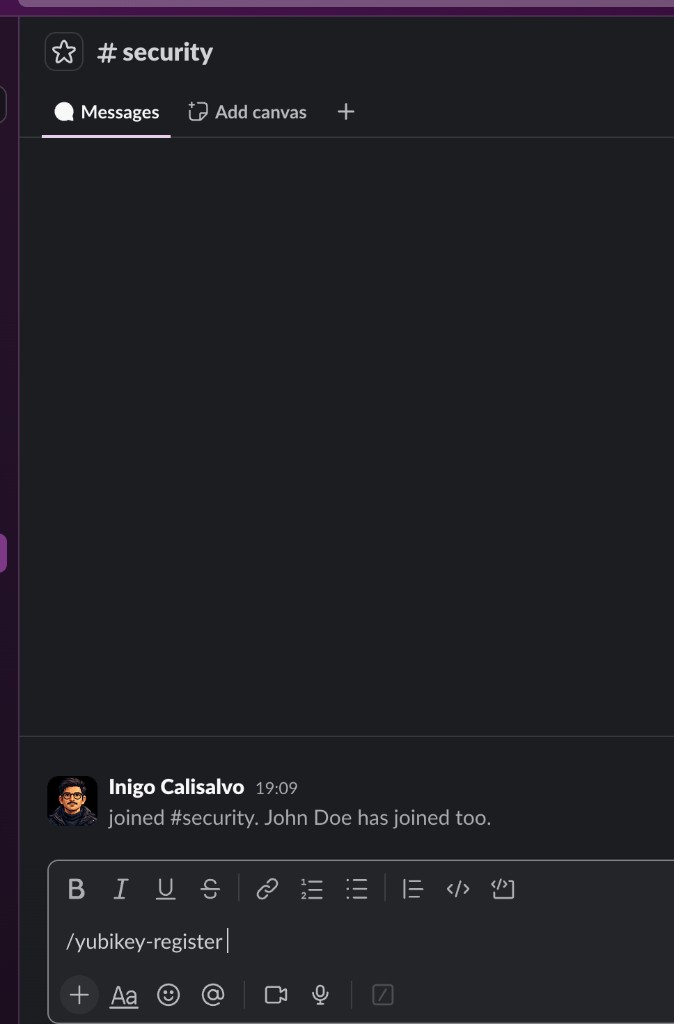

Open Impersonation Protector from the sidebar and run the command there:

/yubikey-register in your DM with Impersonation Protector.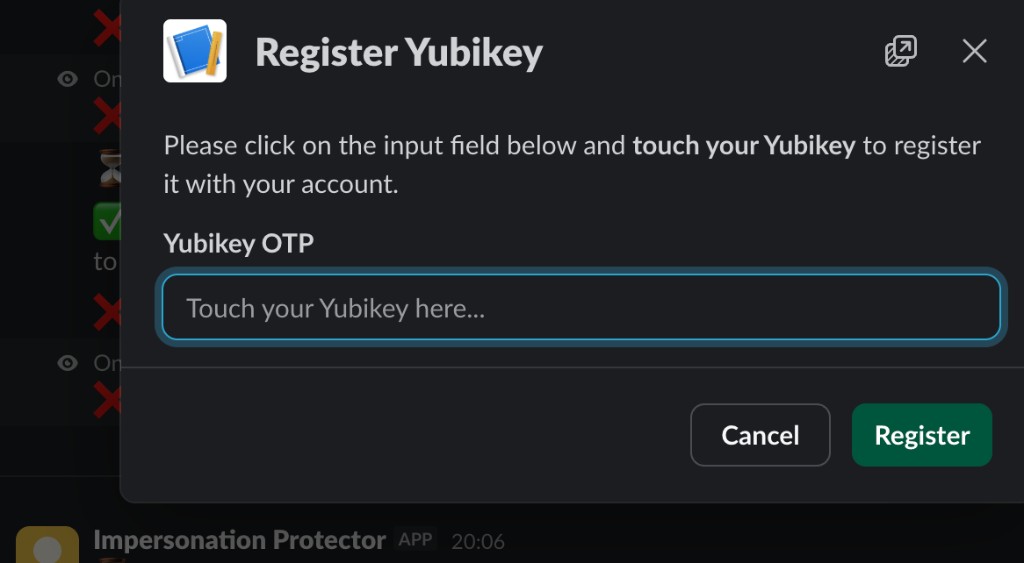
The OTP is validated against YubiCloud immediately, but nothing is written to the database yet. The bot tells you the request is queued for admin review:

Meanwhile, a restricted admin channel gets the approval card (you configure which channel via ADMIN_CHANNEL_ID), Public ID included so the admin can cross-check the physical key:


Once approved, the bot confirms in your DM, the same conversation where you registered:

That admin gate is what kills the TOFU attack. The backend details are in the section below. Once your key is linked, you’re ready to be challenged at any time.
How It Works: The Challenge-Response Flow
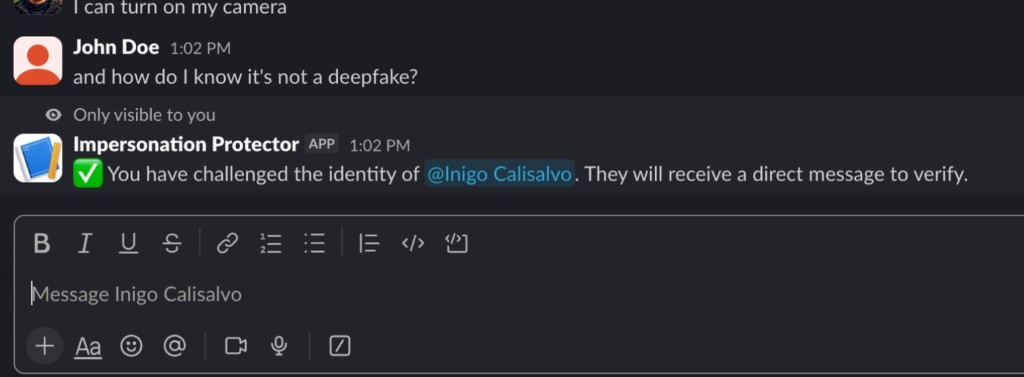
Here’s the full flow in action. John is skeptical that the person on the other end is really Inigo, the classic deepfake scenario from the section above.
The Challenge. When a request feels off, the challenger types /challenge @user right in the conversation.
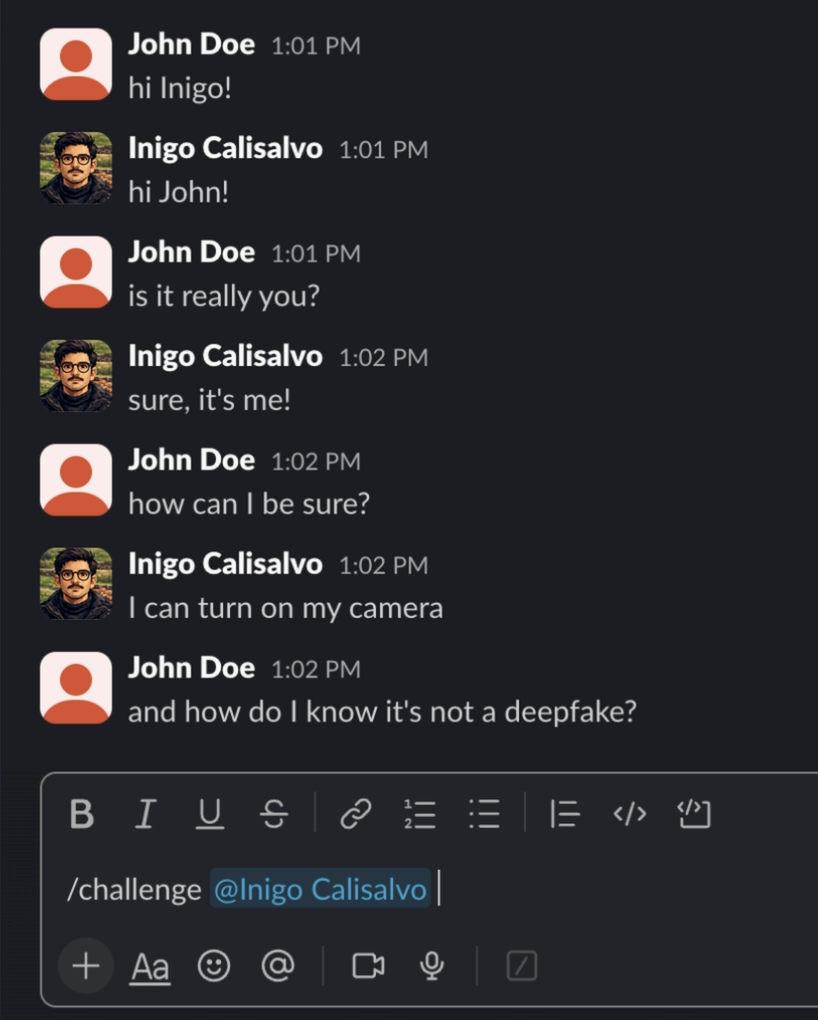
/challenge @Inigo Calisalvo.The Prompt. The challenger gets an ephemeral confirmation. The challenged user receives a DM from the bot with a Verify Identity button.

The Verification. A modal opens. The user touches their YubiKey and the OTP is typed into the input automatically.

The Confirmation. The bot verifies the OTP cryptographically. Both parties get a success message.


Just a physical tap, and you have cryptographic trust. No call, no deepfake risk, no broken async workflow.
Under the Hood: Securing the Yubico OTP Implementation
The UX is super simple. The backend had a few non-obvious details worth getting right.
When you touch a YubiKey configured for Yubico OTP, it spits out a 44-character string in Modhex, an alphabet Yubico designed so that each character maps to the same physical key across common layouts (QWERTY, Dvorak, AZERTY, and others). The OTP arrives correctly regardless of your OS keyboard configuration.

To verify it, the bot talks to the YubiCloud API. But here’s the catch: just throwing the OTP at the API and looking for status=OK in the response is a terrible idea.
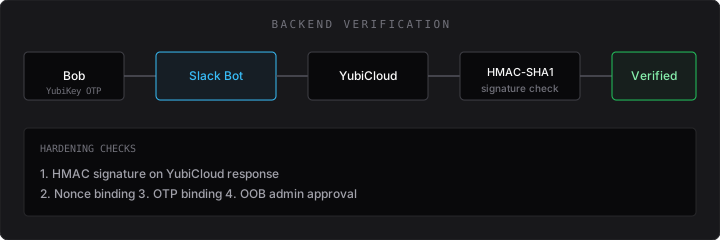
Here is how I hardened the app to stop serious attacks:
1. Defeating Man-in-the-Middle (MitM) Attacks with HMAC-SHA1
If a hacker intercepts the traffic between the bot and YubiCloud (or poisons the DNS), they could just spoof a status=OK response for a garbage OTP.
To block this, I used Yubico’s HMAC-SHA1 signature verification.
When you register for the YubiCloud API, you get a Client ID and a Secret Key. When YubiCloud responds to the bot, it signs its response using the Secret Key.
The bot doesn’t blindly trust the status. It grabs the raw response parameters, sorts them alphabetically, and calculates an HMAC-SHA1 hash using the Secret Key. Then it compares that hash against the h= parameter in the YubiCloud response.
If they don’t match, somebody tampered with the payload in transit. Verification fails instantly.
// Sorting parameters and verifying the HMAC signature
const params = new URLSearchParams(textResponse);
const signature = params.get('h');
params.delete('h');

const sortedParams = Array.from(params.entries())
  .sort(([keyA], [keyB]) => keyA.localeCompare(keyB))
  .map(([key, value]) => `${key}=${value}`)
  .join('&');

const calculatedSignature = crypto
  .createHmac('sha1', Buffer.from(yubicoSecretKey, 'base64'))
  .update(sortedParams)
  .digest('base64');

if (calculatedSignature !== signature) {
  throw new Error('Invalid signature from YubiCloud');
}
2. Preventing Replay Attacks with Nonces
What if an attacker listens in, captures a valid response from YubiCloud, and saves it? Later, when someone challenges them, they could just “replay” that exact same successful response back to the bot.
To kill this attack vector, I generate a cryptographically secure random string, a nonce (Number Used Once), for every single verification request. I send this nonce to YubiCloud with the OTP.
YubiCloud then includes this exact same nonce in its signed response. The bot checks that the nonce in the response perfectly matches the one it just generated. If it doesn’t match, it’s a replay attack, and it gets thrown out.
// Generating a secure nonce
const nonce = crypto.randomBytes(16).toString('hex');

// ... sending request to YubiCloud ...

// Verifying the nonce in the response
if (params.get('nonce') !== nonce) {
  throw new Error('Nonce mismatch. Potential replay attack.');
}
3. OTP Binding
Finally, I make sure the response I get is actually for the OTP I sent. I verify that the otp= parameter in the signed YubiCloud response perfectly matches the OTP the user typed into Slack. This stops an attacker from swapping out the OTP mid-flight to get a valid signature for a different key.
4. Solving the “Trust On First Use” (TOFU) Dilemma
The walkthrough above already shows the user-facing side of registration: DM-only command, YubiCloud validation, admin approval, then confirmation. That UX exists because of a specific threat.
The TOFU problem: an attacker who hijacks a Slack session before the real user registers can open the bot DM, run /yubikey-register, touch their own YubiKey, and submit a cryptographically valid OTP. Without a gate beyond “OTP checks out,” they’d own the identity binding for that Slack account.
Restricting registration to the app DM doesn’t stop that. A session hijacker can open Impersonation Protector just as easily as the legitimate user. The DM-only rule is context hygiene (keep OTPs out of team channels), not an anti-TOFU control.
The actual TOFU fix is a pending-then-approve lifecycle:
- No database write on submission. When the user hits Register, the bot validates the OTP with YubiCloud and stores the request in a pending state. Nothing is linked to the Slack account until an admin approves. A hijacker who completes the modal still waits in queue like everyone else.
- Out-of-band verification before Approve. The admin card from Step 4 includes the Public ID so the reviewer can match it against the physical key. Before anyone hits Approve, verify out-of-band: Signal ping, shoulder tap, whatever your team uses. Cryptography proves the key is real; the admin proves it belongs to the right person.
- Strict 1-to-1 mapping. The schema enforces one active YubiKey per Slack user. No secondary keys, no downgrade to an older device sitting in the database.
- Explicit replacements. If a registered user submits a new key, the admin card flags it as a
REPLACEMENT REQUESTwith the old Public ID. Approval atomically revokes the previous key and binds the new one. No ghost keys, no race where two devices are valid at once.
Put together: a session hijacker can trigger the registration flow, but they cannot finalize it without an admin who verifies out-of-band. That’s what strips the silent foothold, even when the attacker fully controls the Slack session.
Conclusion
We live in a world where session cookies get stolen, text gets mimicked, and voices get cloned. You can’t just assume trust anymore. You have to cryptographically prove it.
By pulling hardware-backed verification straight into the tools we actually use, we can kill session hijacking dead in its tracks, without ruining the speed of async work.
Next time a Slack request feels sketchy, you don’t need to guess, and you don’t need to hop on a call. You just type /challenge.